![Realtair RGB Green Box Logo.jpg]](https://help.realtair.com/hs-fs/hubfs/Realtair%20RGB%20Green%20Box%20Logo.jpg?height=50&name=Realtair%20RGB%20Green%20Box%20Logo.jpg)
A Starting Offer sets the minimum offer amount buyers can submit through the listing. Learn how to add it to your Private Treaty or Timed Sale on Victorian properties.
Before you start
Make sure you have:
- An existing campaign for the property.
- Sell enabled on your subscription.
- The Price Guide for the property.
- The Property Price Statement, if it hasn’t already been uploaded.
- The fixed end date or sale date for the listing.
The fields and options you see may vary depending on your permissions, sale type, product version, and office configuration.
Step 1: Open the property listing
- Log in to Realtair.
- Open the relevant Victorian campaign.
- Select Sell.
- Open the property listing, or select Activate if you’re setting up a new listing.
Step 2: Check the sale type
Select the relevant sale type:
- Private Treaty with a fixed end date
- Timed Sale
Timed Sale and Private Treaty listings use a Starting Offer. Victorian auctions continue to use a Reserve Price instead.
Step 3: Add the Price Guide
A Price Guide is required when you manually activate a Victorian listing or edit an auto-activated listing. Your CRM may prefill the value, but you should check it before continuing.
-
Find the Price Guide field.
-
Enter the property’s Price Guide as free text.
-
If your CRM has prefilled the field, check that the value is correct. Save the listing or continue with the activation form.
-
For Victorian listings, the Price Guide displays automatically.

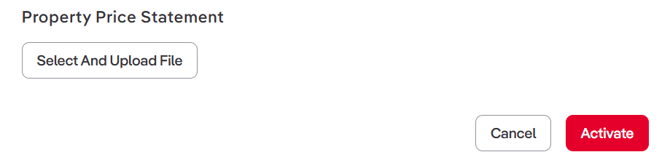
Step 4: Upload the Property Price Statement
- Go to the Property Price Statement section.
- Upload the required document, or confirm that your CRM has supplied it.
The document previously called Statement of Information is now labelled Property Price Statement in the activation and property workflows.
Step 5: Add the Starting Offer
- Enter the Starting Offer amount.
- Confirm the required acknowledgement for the Starting Offer at the bottom of the page.
- Proceed with the activation or update.
Important:
- For a Timed Sale - Add the Starting Offer at least 7days before the sale starts.
- For a Private Treaty listing with a fixed end date - Add it at least 7 days before the fixed-date sale.
Adding a Starting Offer is not required to activate the Sell listing, but you must provide it before the 7-day disclosure deadline.

Step 6: Check the property checklist
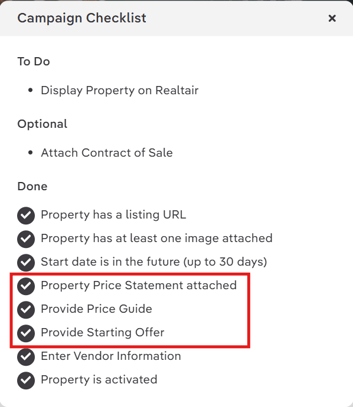
Return to the property Details page and review the checklist.
Confirm that the relevant items appear in the Done section:
- Property Price Statement attached.
- Provide Price Guide.
- Provide Starting Offer.
The checklist item may remain in To Do until you save the Starting Offer and refresh the page.
Step 7: Review reminders
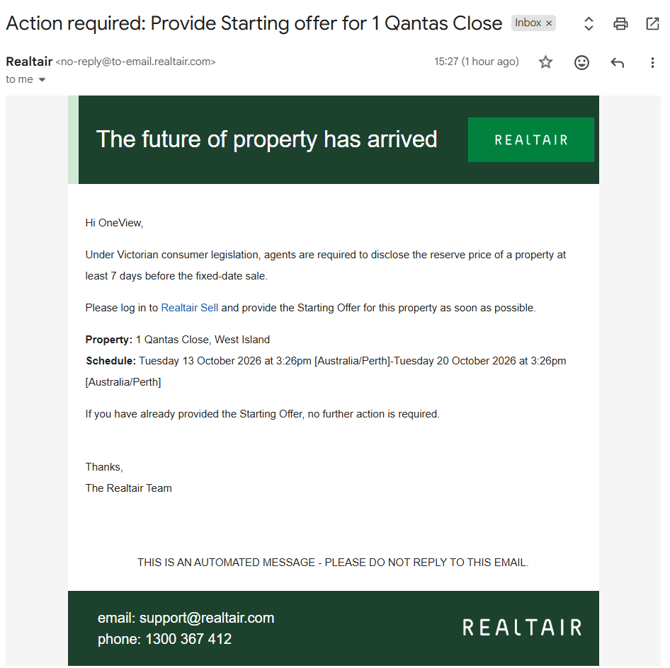
- Realtair displays an in-app reminder when the Starting Offer is missing 10 days before the fixed-date sale.
- If the Starting Offer is still missing seven days before the sale, Realtair displays a warning and sends an automated email reminder to the Primary Agent and Conjunction Agents.
It is recommended to add and publish the Starting Offer before the 7-day deadline.
Step 8: Check the public listing
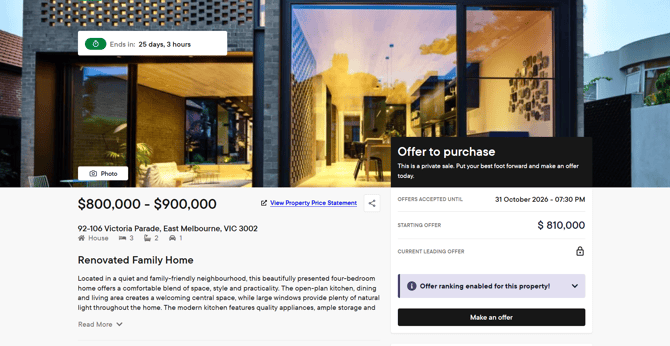
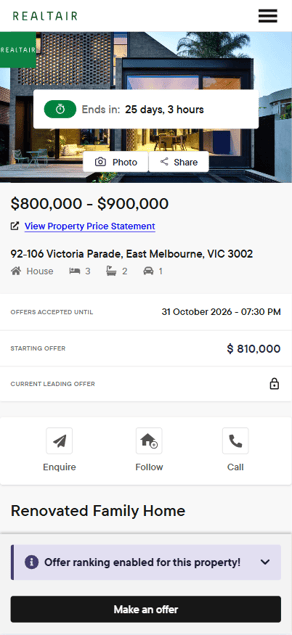
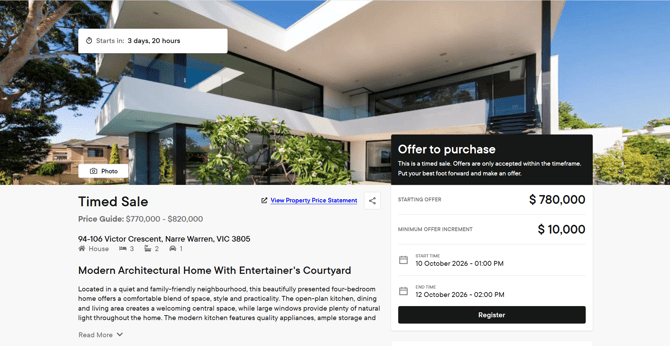
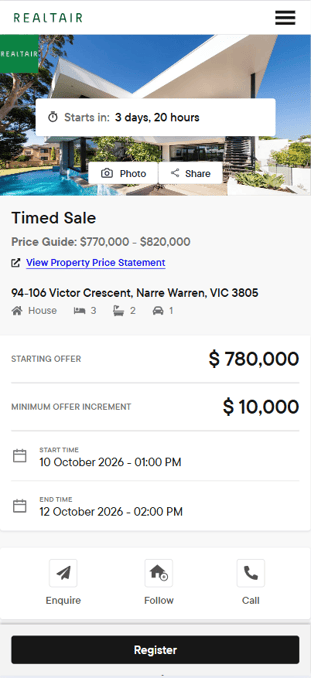
- Open the buyer-facing listing and confirm that the Starting Offer appears correctly.
- The Starting Offer displays on Victorian Timed Sale and Private Treaty listings when it has been supplied and the listing information has been updated.
- Generate a new Share QR code PDF after saving or changing the Starting Offer.
- Check that the new PDF shows the same information as the public listing.
Note: Always refer to new PDFs. Older PDFs may not include the latest listing information.
FAQs
What happens if a buyer submits an offer below the Starting Offer?
Realtair blocks the offer when a Starting Offer has been provided for a Private Treaty listing.
The buyer must submit an offer equal to or greater than the Starting Offer.
Timed Sale listings also block offers below the Starting Offer when one has been provided.
Can I use a Reserve Price for a Private Treaty or Timed Sale listing?
No. Victorian auctions use a Reserve Price. Timed Sale and Private Treaty listings use a Starting Offer.
Is the Starting Offer required before I activate the listing?
No, the Starting Offer is not required to activate the listing, but you must provide and publish it at least 7 days before the Timed Sale or fixed-date Private Treaty sale.
Why is the Starting Offer warning still showing?
You may try the following steps:
- Edit the details and enter the missing value in the “Starting Offer (As per your State regulations)” field.
- Save the value, then return to the Details page and refresh.
- Confirm the listing method of sale has not changed. Auction listings use Reserve Price, while Timed Sale and Private Treaty listings use Starting Offer.
When is the Starting Offer shown publicly?
Starting Offer is shown on Victorian Timed Sale and Private Treaty listings when a Starting Offer has been supplied and the listing information has been updated. Reserve Price are not displayed for Timed Sale or Private Treaty listings.