![Realtair RGB Green Box Logo.jpg]](https://help.realtair.com/hs-fs/hubfs/Realtair%20RGB%20Green%20Box%20Logo.jpg?height=50&name=Realtair%20RGB%20Green%20Box%20Logo.jpg)
The Price Guide is required when you manually activate a listing or edit an auto-activated listing, regardless of the method of sale.
Realtair supports your workflow, but your agency remains responsible for checking that the price is accurate and compliant. It is recommended to review pricing in accordance with the NSW Fair Trading's underquoting guidance.
Before you start
Make sure you have:
- An existing property campaign.
- Sell enabled on your subscription.
- Permission to create or edit the property listing.
- The property’s current Estimated Selling Price (ESP) and supporting price information.
If your office uses a customer relationship management (CRM) integration, some property information may already be available in Sell. Check the imported information before continuing.
Step 1: Open the property listing
- Log in to Realtair.
- Open the relevant campaign.
- Select Sell.
- Open the property listing you want to create or edit.
- Select Edit if the listing is already active.
Step 2: Enter the display price
Enter the property’s display price as either:
- A single figure.
- A price range.

Use numbers and supported characters only. Supported characters include:
- Dollar signs.
- Commas.
- Hyphens.
- Decimal points.
Suitable formats include:
- $900,000
- $900,000 - $990,000
Avoid formats such as:
- “Starting at $900,000”
- “Offers above $900,000”
- “Contact Agent”
- “Price on application”
For more information, see the NSW Fair Trading's underquoting guidance. Contact your agency’s compliance or legal team if you’re unsure of how to approach pricing.
For CRM listing uploaders
Realtair removes text from CRM-prefilled values. A text-only value, such as “TBD” or “Place your best offer”, may leave the Price Guide empty.
- Review the Price Guide if Sell imported it from your CRM.
- Replace any empty or incomplete value with a single price or price range.
Step 3: Save the listing
- Save the listing.
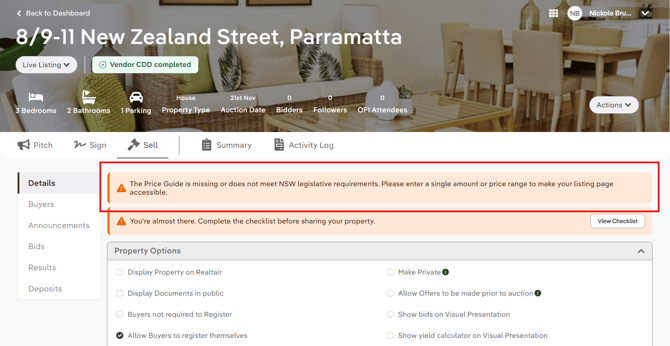
- Check that the Price Guide appears on the listing Details page.
- If Sell displays a reminder or warning, open the listing details and enter a valid numeric price.
Step 5: Check the public output
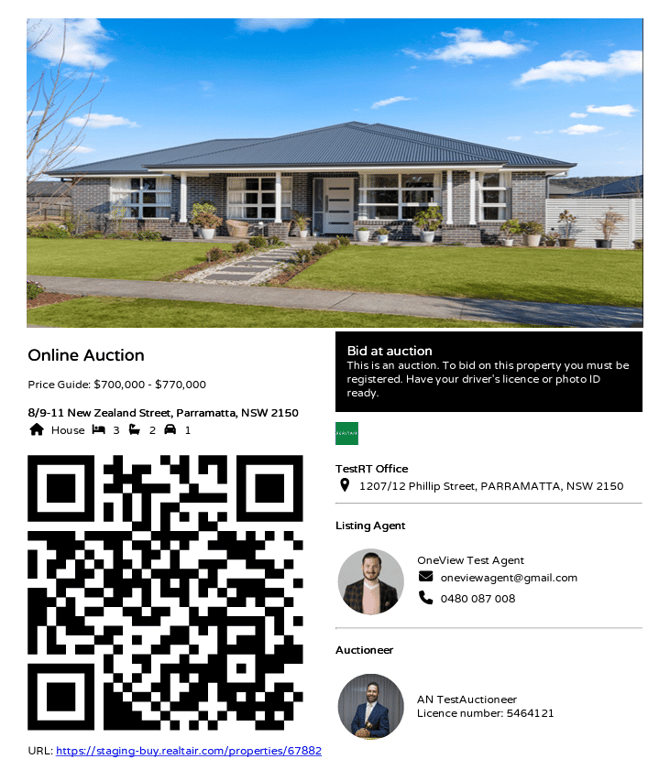
- Download the Share QR code PDF and confirm that the Price Guide appears.
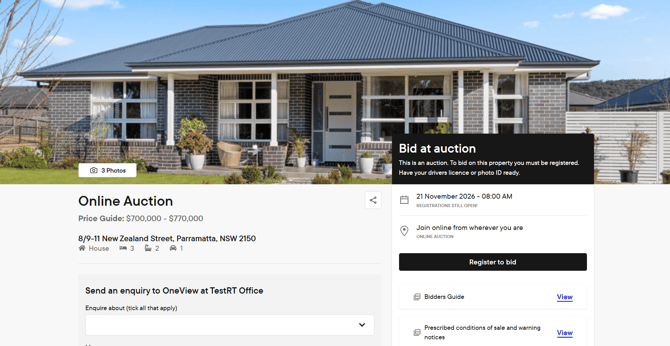
- Open the public listing page and confirm that:
- The page loads.
- The Price Guide appears below the method of sale.
- The displayed value matches the saved Price Guide.
Note: If the public listing page is inaccessible, the Price Guide is missing.
What happens for NSW Private Treaty listings?
The Display Price Guide option is removed for NSW Private Treaty listings.
Sell displays the saved Price Guide automatically on the public listing. The Price Guide also appears in the Share QR code PDF and the Offer workflow when offers are enabled.
You can’t hide the Price Guide using the property options.
What should I do if the Price Guide is missing from the public listing?
- Open the listing details.
- Check whether the Price Guide is empty.
- Enter a single price or price range.
- Save the listing.
- Check the public listing again.
A valid value should remove the warning and restore access to the public listing page.
FAQs
Is the Price Guide required for every NSW sale method?
Yes. Sell requires a Price Guide during manual activation and editing for every method of sale, including Private Treaty.
Why did the Price Guide from my CRM change or become blank?
Realtair strips text from CRM-prefilled values. A text-only value leaves the field empty. Enter a single price or price range to resolve the issue.
Can I use “offers above” with a price?
No. Use a single price or price range without qualifying wording.
Can I hide the Price Guide on an NSW Private Treaty listing?
No. The Display Price Guide option is removed, and Sell displays the saved Price Guide automatically.
Will Sell always block an invalid Price Guide?
Sell warns when the Price Guide is missing or invalid. Confirm the final behaviour for each save and publish scenario before promising that every invalid value will be blocked. The Product initiative records the exact validation and blocking behaviour as requiring confirmation.
Does this feature make my advertising compliant automatically?
No. Sell supports Price Guide entry and display, but your agency remains responsible for checking the price, advertising and supporting records.